By AJ Yates
Mental Load Manager: How To Get AI To Keep Track Of Your Entire Life In 5 Minutes A Day
You're needed everywhere. But who's helping you think through everything?
Talk through what is on your mind for about five minutes a day. It gets sorted, saved, and brought back to you when it matters, across your family, your work, and your own life.
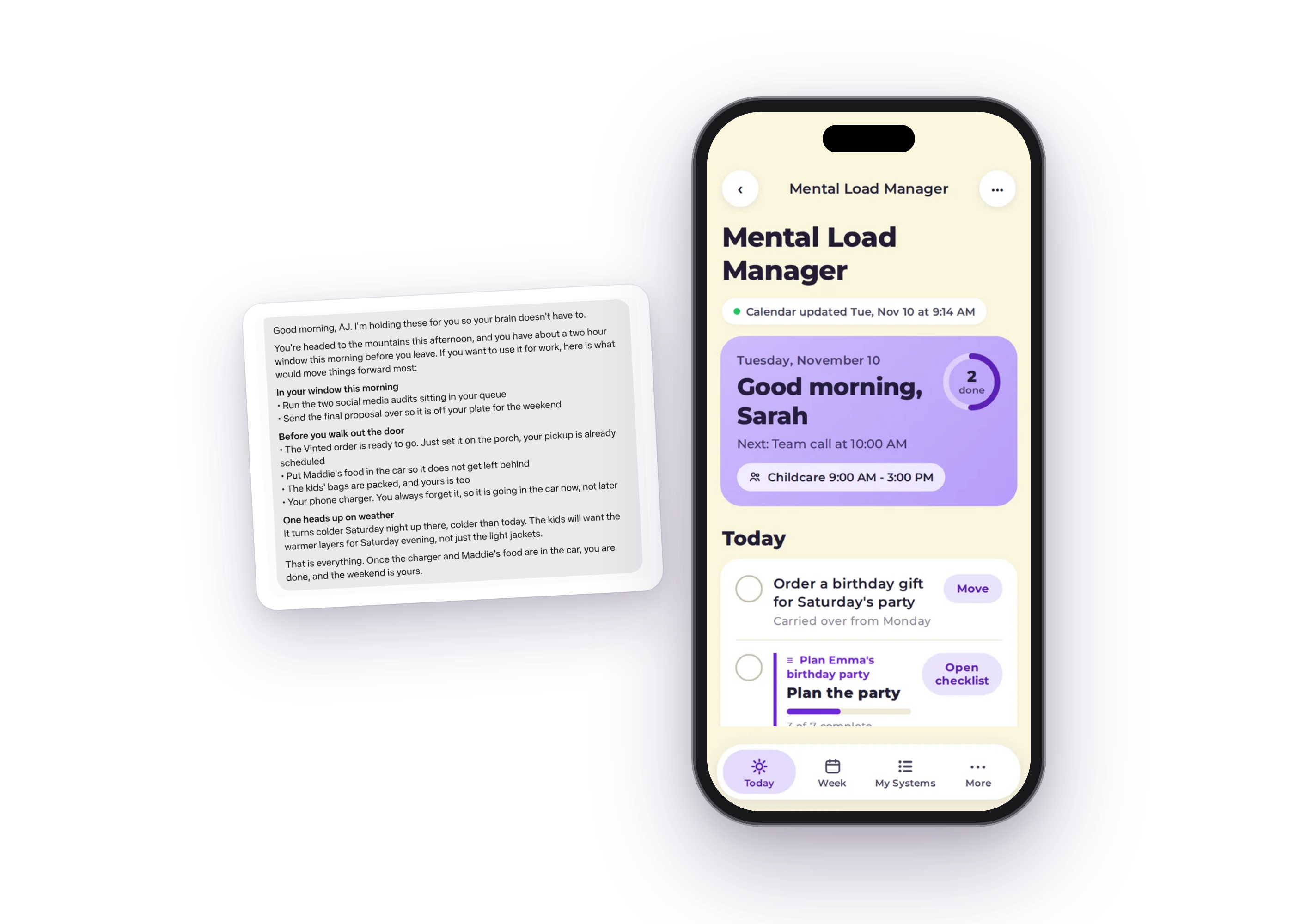
$27 one time
One-time purchase. Not a subscription. Launch price ends Thursday, November 19, then it goes up to $37.
Visualize with me
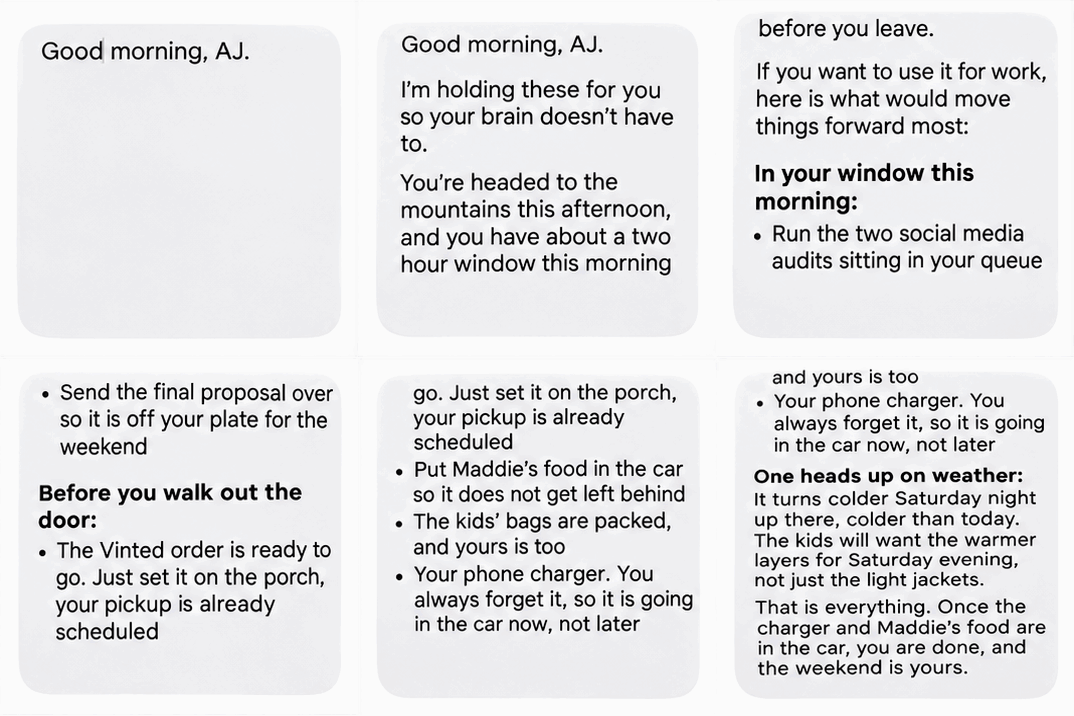
Picture tomorrow morning
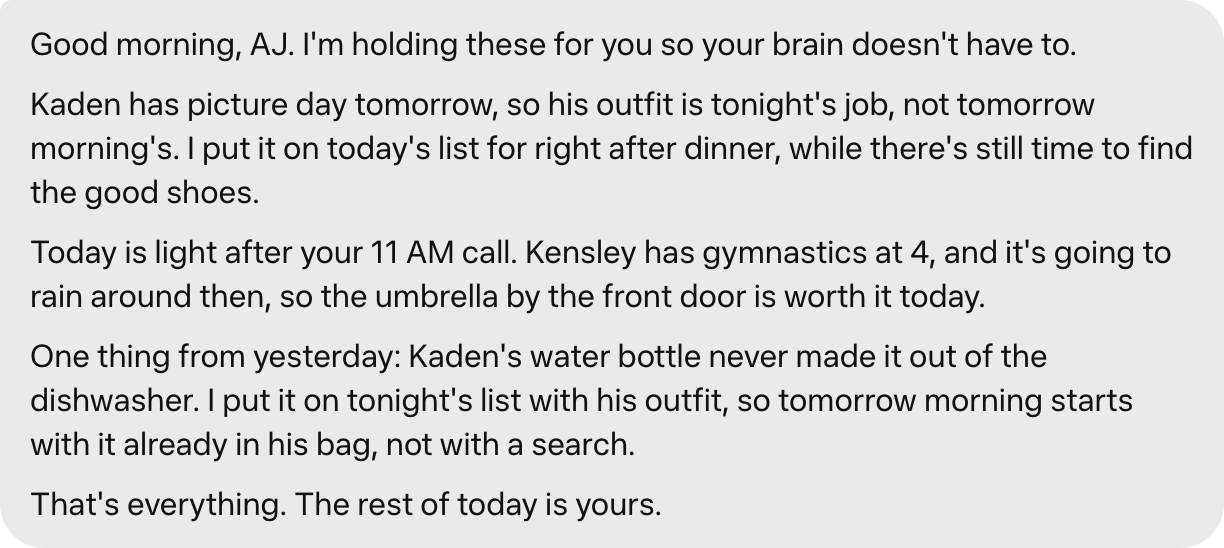
See where it says "Good morning, AJ"? Put your name there.
That message is real. It is the first thing waiting for me in the morning: my day already thought through, the little things surfaced before they can sneak up on me, everything I was carrying, held.
Now imagine yours. Your calendar, your kids, your work, your life, thought through before the day gets crazy. A second brain holding all of it with you, so yours doesn't have to.
One-time purchase. Guided setup included.
My real experience
I mentioned needing a new pediatrician. Here's what happened the next day.
I built Mental Load Manager for myself, because making lists still left me doing all the thinking behind them: anticipating, researching, deciding, remembering, following up. Once the system started carrying that thinking with me, my mornings changed. Here is the moment I knew it was different.
During a regular brain dump, I casually mentioned that I needed to find a new pediatrician and schedule my kids' well checks. I named a practice I was considering. That was it. I did not ask for research.
Mental Load Manager added finding a pediatrician to my list. Then the next day, without me bringing it up again, Muse proactively sent me a message. It had researched the practice, laid out its membership model and pricing, flagged what still needed to be verified, and suggested questions to consider before deciding.
I didn't need another reminder to find a pediatrician. I needed help with all the thinking that goes into finding one.
This is my real experience, shared as an example of what happened for me.
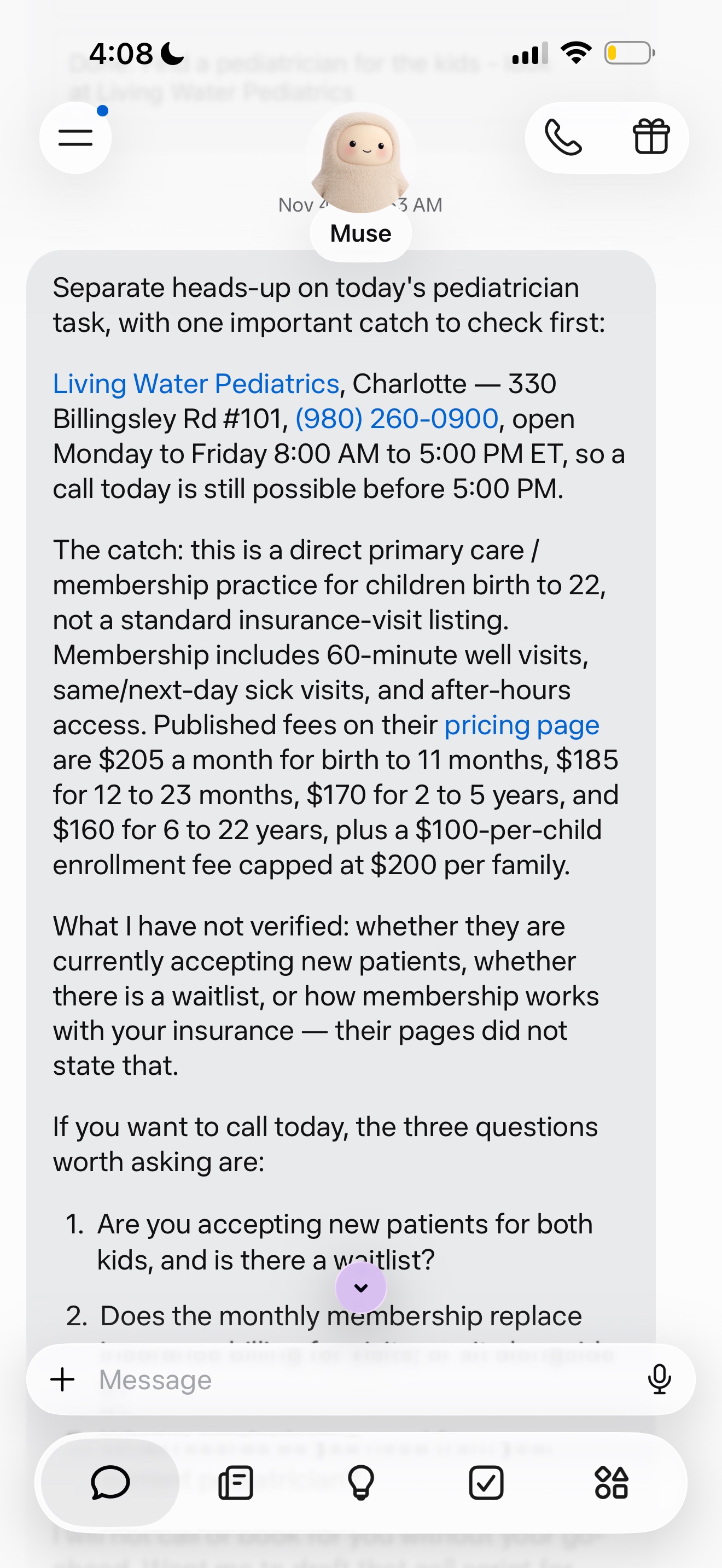
The next-day message, shown as it arrived.
Example AI Message
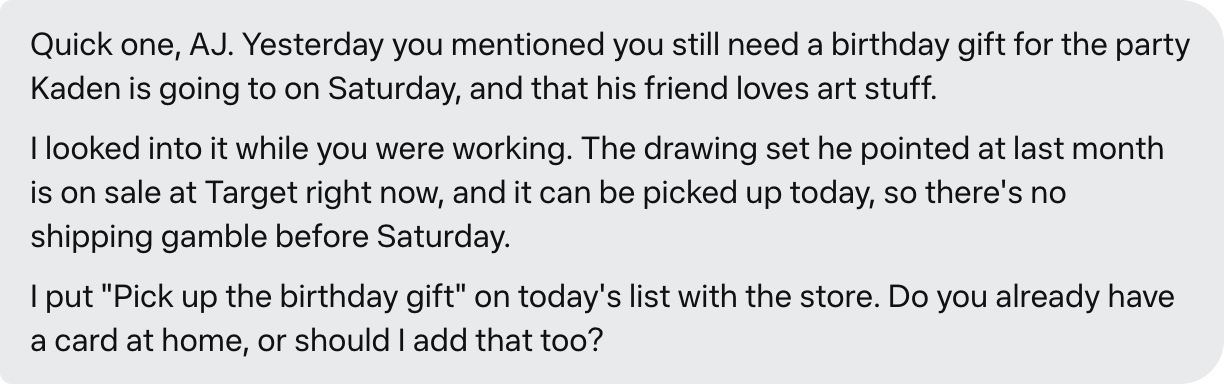
A regular Tuesday. Mentioned once in a brain dump, already looked into by the next day.
It's not the task. It's all the thinking behind the task.
The way this works is very different from a list, because the list was never the heavy part. You are the one anticipating, deciding, remembering, and following up, at home, at work, and for the people you love.
The things that don't demand your attention are often the first things you stop giving attention to.
That is usually where your own health, your friendships, and the things that matter to you personally end up. Not because they matter less. Because nothing about them is shouting.
A to-do list makes it look simple. One line, one task. Behind almost every line is a string of thinking nobody else sees.
A birthday party
Deciding when to have it. Building the guest list. Sending invitations. Tracking who has replied, remembering who has not, and following up. Coordinating schedules and thinking through what still needs to happen.
A doctor's appointment
Remembering to schedule it. Choosing the right provider. Working through insurance questions. Keeping track of what to ask, what was recommended, and what needs a follow-up afterward.
A work project
Figuring out what has to happen first. Knowing who needs what from you, and when. Making decisions, tracking progress, and remembering the small things that could hold it up.
That thinking has four parts:
Noticing what needs to happen before it becomes urgent.
Looking into possibilities and gathering what you need to choose well.
Thinking a choice through and settling on what to do next.
Keeping track of what is done, what is still open, and what needs following up.
Myth: You need more discipline and a better planner. Fact: You need help with the thinking behind the tasks.
One-time purchase. Not a subscription.
You do not need any of this
Most systems ask for more from you before they give anything back. This one was built the other way around. None of these are required:
- A planner you have to keep up with
- Typing everything in by hand
- A complicated setup
- Tech skills
- An hour a day
The setup is guided, step by step, and the daily habit takes about five minutes.
"I'm not tech-savvy. Will I actually be able to do this?"
Yes. The guided setup walks you through every step in plain language, and the short videos show you exactly what to do. After that, the daily habit is simply talking through what is on your mind. If you can send a voice message, you can do this.
One-time purchase. Guided setup included.
Muse is the intelligence.
Muse is the AI built by Meta, the company behind Facebook and Instagram. It does the thinking, the remembering, and the coming back to you. The Mental Load Manager is the structure I built on top of it, so it holds your whole life instead of just answering questions.
Why Muse?
It connects to your real life. Email, calendar, Facebook, Instagram, Messenger, WhatsApp, one tap each.
It lives on your phone and has its own browser. Your computer never has to be open or even on.
It comes back to you on its own. Morning briefs, reminders, and check-ins arrive on schedule, without you asking.
You stay in control. Nothing gets sent, posted, or spent without your approval.
Already using ChatGPT or Claude?
Keep them. They are great for questions and projects. Muse is different: it connects to your email, your calendar, and your life, and it comes back to you on its own. That is why your personal assistant lives here.
See the real product
Not illustrations. These are the actual screens you will use every day.
Take a look inside the Mental Load Manager
Tap through the same welcome tour new customers take, shown here with sample content so you can picture your own name in it.
Welcome
Good morning, Sarah
Welcome to your Mental Load Manager
This short tour is the same one waiting for you after setup, in AJ's own words. Follow along with Sarah's demo and picture your own day in its place.
8 stops, plus a closing note from AJ
Mental Load Manager
That is the whole tour, just as it runs inside your own Manager after setup. When yours is ready, your first brain dump is where it all begins.
Demo shown with sample content for Sarah and Emma
This is a public preview with sample content only. Nothing you do here is saved, and no brain dump is collected on this page.
Make it yours.
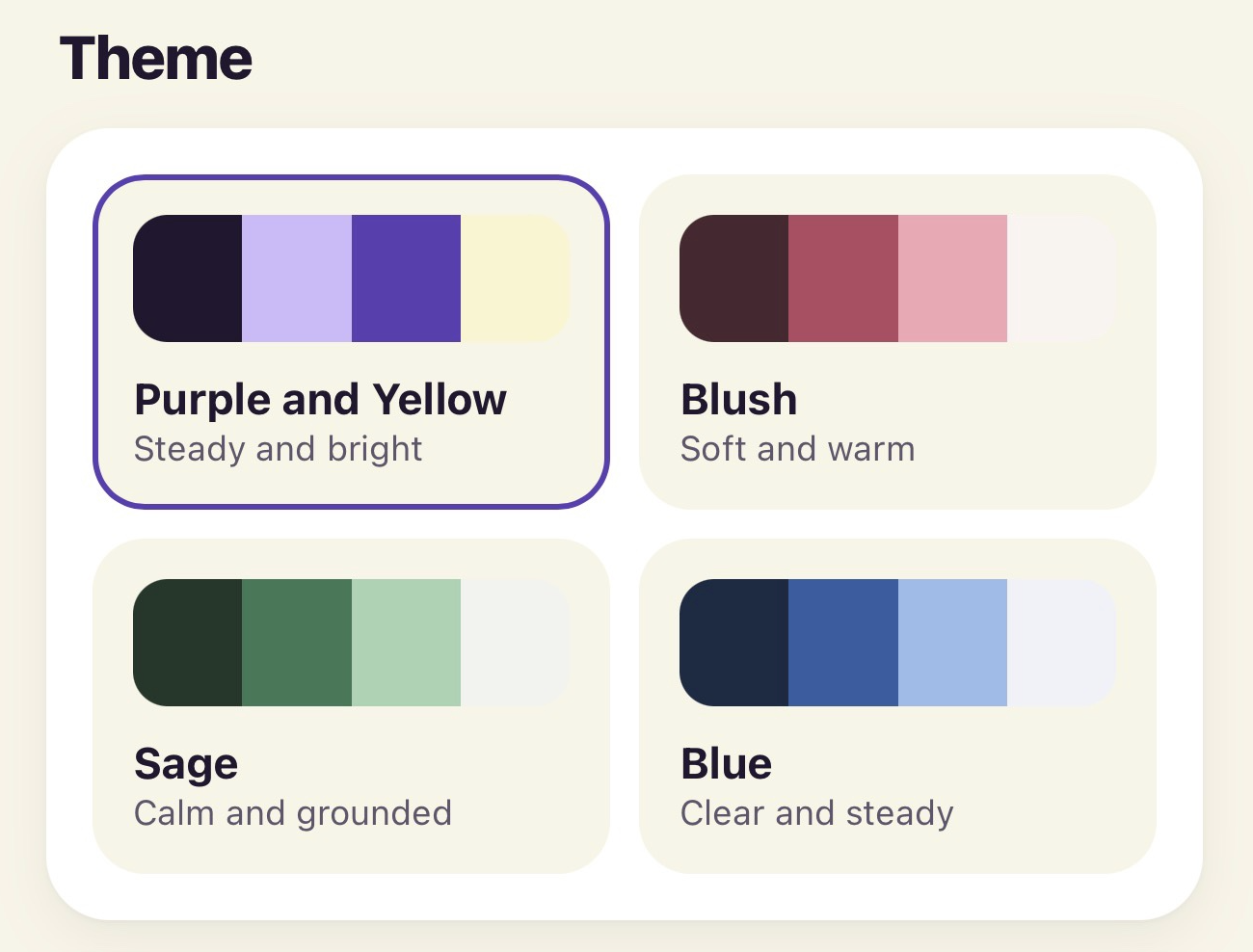
Your name on the greeting. Your people, your habits, your childcare hours. And colors that feel like you: four themes are built in, and switching takes one tap. Same second brain, dressed like yours.
One system for your whole life
Your mental load does not stay in one lane, so your system should not, either.
Family and Home
Finding a pediatrician and scheduling well checks. School activities and family schedules. Birthday parties, invitations, and RSVPs, plus the details around all of it.
Work and Business
Preparing for a launch. Client follow-ups and project decisions. Meetings, deadlines, and the things you are waiting on from other people. I am using this system to help plan the launch of this very product.
Relationships and Friendships
A friend's birthday, thought about early enough to choose a gift that actually feels thoughtful. Remembering what someone shared with you. Checking in when a friend is going through something hard.
Personal Health and Self-Care
The dentist appointment you keep putting off. Your annual physical. A skin check. Follow-up appointments and the personal routines you want to keep, given a real place in the system.
Personal Life, Faith, and Growth
Quiet time and reflection. A personal goal you keep meaning to return to. A habit you want to keep. Making room, on purpose, for what matters to you.
Example AI Message

"Do I need a paid Muse subscription?"
Built for Muse, a free-to-start AI platform.
I ran the Mental Load Manager on the free plan for a long time before I upgraded, and the friends testing it are on the free plan too. Most women can run it on free. How far free goes depends mostly on how many scheduled tasks and reminders you run. Your $27 buys my system; it does not include a Muse subscription.
One-time purchase. Not a subscription.
How it works
Three steps, once a day.
Talk
Talk through what is on your mind for about five minutes, in any order. Tasks, decisions, appointments, worries, and ideas can all come out in the same breath.
It gets sorted
What you said is organized for you, saved, and placed where it belongs, so nothing depends on you remembering it later.
See your day
Open your dashboard and see what actually needs you today, with the details already held for you.
Example AI Message

Hi, I'm AJ
I'm a mom of two young kids, and I run my businesses from home. My life has a lot of moving pieces, and most of them run through me.
I'm ambitious, I'm capable, and I'm a problem solver. What I have never been is naturally organized, and for a long time I thought that was the issue I needed to fix.
Then I realized something. Even when I made the lists, I was still the one responsible for all the thinking behind them. Anticipating what was coming. Researching the options. Making the decisions. Remembering the details. Following up. Across my family, my work, my relationships, and my own life, it was all still sitting in my head.
So I started using AI differently. Instead of only asking it questions, I built a system inside Muse that could help me carry the mental load of everyday life. A place where I could talk through everything on my mind and get help thinking through it, organizing it, and anticipating what comes next.
I built Mental Load Manager for myself. Once I saw how much it was helping me day to day, I knew I wanted other women to have it, too.
One-time purchase. Not a subscription.
Example AI Message

What you get for $27
Everything below is included in the core product.
[Launch Bonus]10 Conversations to Train Your AI to Remember Everything, So You Don't Have To (Ten short interviews that teach your AI who and what matters in your life, so it remembers for you.)
[Launch Bonus]Everyday AI Community (A free group where we figure out everyday AI together, sharing how we actually use it in real life.)
The Mental Load Manager installation file (The one file that sets up your whole system. If you can save a file and upload a file, you can do this.)
Your personalized dashboard setup (Your name, your people, your habits and your childcare hours, built around your real life.)
The guided onboarding experience (Step-by-step guidance in plain language, from setup through your first brain dump.)
The short instructional videos (Watch it done on a phone and on a computer, then follow along at your own pace.)
The built-in plans and tools included in the core product (Ready-made help for the recurring parts of life, already inside when you start.)
$27
One-time purchase.
Launch price ends Thursday, November 19. Then it goes up to $37.
Made for women with full lives, whether you run a business, a household, or both.
This purchase is not a subscription. You pay $27 once for Mental Load Manager.
Muse is a separate AI platform. Your $27 buys my system, not a Muse subscription.
Installation file, guided onboarding, and short videos included.
One more thing, free with your purchase
Launch Bonus
10 Conversations to Train Your AI to Remember Everything, So You Don't Have To
Ten short interviews that teach your AI who and what matters in your life, so it remembers for you.
$47FREE
Included free with your purchase.
What comes back after the 10 Conversations
Ten short interviews teach it your life. This is what comes back.
Family and Kids
Relationships and the People I Love
Home and How It Runs
Money and Finances
My Health
Work and Business
Dates and Events
Trips and Travel
Decisions I'm Carrying
Get It All Out
Launch Bonus
Everyday AI Community
A free group where we figure out everyday AI together. Members share how they are using it in real life and learn from each other, AJ shares the actual ways she uses it in her own day, and she listens there for the solutions members need next.
FREE
The community is a free bonus, not part of the paid product. It runs while it is active and will evolve as these tools change.
One-time purchase. Not a subscription.
Questions, answered honestly
Do I need a paid Muse subscription?
Probably not. Most women can run this on the free plan. Meta's own site says Muse is free for most of what people need. I did, for a long time as a tester, and how far free goes depends mostly on how many scheduled tasks and reminders you use. Built for Muse, a free-to-start AI platform. Your $27 does not include a Muse subscription. Muse is available in the US and Canada, for ages 18 and up.
Is this difficult to install?
No. You receive the installation file and short videos, and the guided onboarding walks you through setup step by step, in plain language.
What if I'm not tech-savvy?
This was made for you. The setup is guided, and the daily habit is simply talking through what is on your mind.
Does it actually do things for me, or help me manage them?
It helps you manage them. It helps with the thinking, remembering, organizing, and following up, so the doing itself feels lighter. You stay in charge of booking, calling, and sending.
How much time does it take each day?
About five minutes of talking. That short daily habit is what keeps your system current.
Can I use it for work and personal life?
Yes. It is built for your whole life: family and home, work and business, relationships, your health, and your own priorities, all in one system.
When does the launch price end?
The $27 launch price ends Thursday, November 19. After that, Mental Load Manager stays on sale at its regular price of $37. The two launch bonuses, the 10 Conversations and the Everyday AI Community, are included free.
What happens after I purchase?
You receive the installation file, the short instructional videos, and the guided onboarding experience. You follow the setup, your personalized dashboard is created, and you can start with your first five-minute brain dump.
You do not have to carry all the thinking alone
A second brain that thinks with you, helps you think ahead, and helps carry the mental load.
It's not the task. It's all the thinking behind the task. And that thinking deserves help, across your family, your work, your relationships, your health, and your own life.
You're needed everywhere. Now you can have help thinking through everything.
Example AI Message
One-time purchase. Not a subscription. $27 launch price ends Thursday, November 19, then $37.
P.S. Want to see it in action?
60-second video goes here
Talking through what's on her mind, then seeing it organized.
The Mental Load Manager installation file, guided onboarding, and short instructional videos
Your personalized dashboard for family, work, relationships, health, and your own life
Launch bonus: 10 Conversations to Train Your AI to Remember Everything, So You Don't Have To — $47 free
Launch bonus: the Everyday AI Community, free during launch week
$27
One-time purchase. Launch price ends Thursday, November 19, then $37.
Not a subscription. Built for Muse, a free-to-start AI platform.